


A sunset on your wrist.
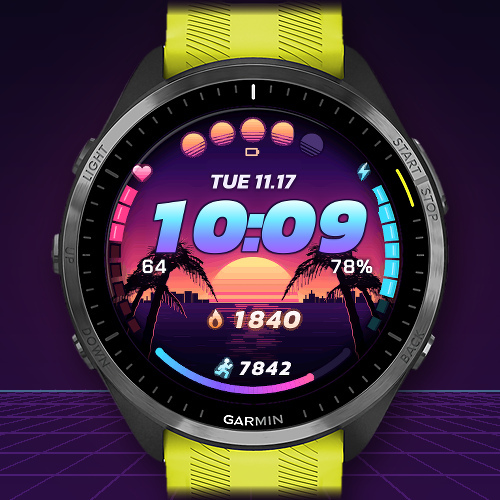
Palms at sunset, big neon digits and the stats you want to see on your Garmin watch.
For compatible round Garmin AMOLED watches.
ReleasedSunset with distance and floors
Original product view · watch mockup. Watch not included.
Dawn to neon night
Choose morning light, sunset or neon night. Set your own times for the sky to change, let it follow local sunrise and sunset, or keep your favourite scene all day.
Dawn1 / 3
Dawn
Native simulator examples · watch mockup. Watch not included.
Your stats at a glance
The five suns can show battery level or intensity minutes. For training, put distance in the centre and steps at the bottom. The side arcs can show stress and Body Battery.
For a cleaner view, hide the sun scale, either side number or the bottom arc individually. The sunset stays in the artwork.
Sun scale on1 / 3
Sun scale on
Original product view · watch mockup. Watch not included.
20 neon palettes for your watch
Pick one of 20 neon palettes, then tune the time gradient and glow, arcs, date or data icons separately. Use the design shuffle for a fresh colour combination.
Choose 12- or 24-hour time, date, seconds and wake animation. Always-on keeps the time visible, with the date if you like. On compatible touch watches, press and hold the time to open a shortcut such as Weather or Calendar.
Sunset1 / 2
Sunset
Native simulator examples · watch mockup. Watch not included.
Try it free for 24 hours
The trial starts when you first open the watch face. Find the pairing code in the unlock notice on the watch or in Connect IQ under NEON SHORE → Settings → Unlock. The time and settings remain available after the trial.
After payment is confirmed, sync your watch with Garmin Connect again. With a connection, activation usually takes up to five minutes. Reopen the Connect IQ settings and look for “Full version active” under Unlock.
Visit the NEON SHORE shop to unlock your watch. The FAQ also explain how to change data fields.
The public download will follow on the Connect IQ Store.
What’s getting better.
A closer look at each version. Test builds are clearly labelled.
Version 2026.11.20Released · NEON SHORE on needbuilt.de
The product page, shop and help for the Garmin watch face are online. The public download will follow on the Connect IQ Store.
New
- Three skies, 20 neon palettes and customisable data fields.